



Adobe Photoshop
Photoshop provides color-management tools for converting and preparing raster images for CMYK printing.
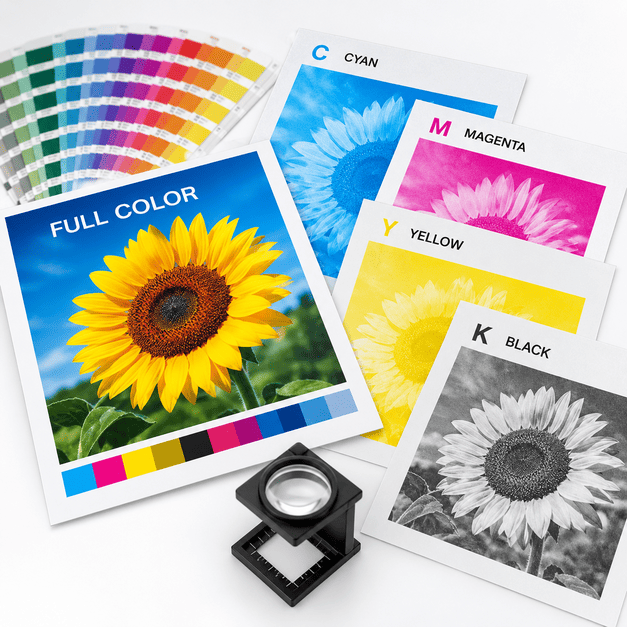
CMYK is the standard four-color process used for most full-color commercial printing. Cyan, magenta, yellow and black inks combine in different percentages to reproduce photographs, graphics, colored text and other printed artwork.
A blue-green process ink used as one of the four components of full-color printing.
A red-purple process ink combined with the other CMYK colors to reproduce a wide range of hues.
The yellow process ink used in four-color image reproduction.
Black ink adds depth, shadow, contrast and crisp black elements to printed artwork.
CMYK stands for Cyan, Magenta, Yellow and Key, with “Key” referring to black.
CMYK can also be described as process color, four-color printing or full-color printing. By combining different percentages of these four inks, commercial printers can reproduce a broad range of colors in photographs, illustrations, logos and other printed artwork.
Unlike a screen, which creates color with light, printing places ink onto paper or another substrate. That difference is why artwork designed for print is commonly prepared in CMYK rather than RGB.
CMYK is a subtractive color model: ink absorbs, or subtracts, portions of the light reflected from the paper.
During full-color printing, cyan, magenta, yellow and black are applied in controlled amounts. Rather than printing every shade as a separate ink, the four process colors combine visually to simulate many different colors.
Printed photographs and tonal graphics are typically reproduced using patterns of very small dots. From normal viewing distance, the eye blends those dots together so the image appears continuous rather than made from individual marks.
 Cyan + YellowCan visually produce green tones.
 Magenta + YellowCan visually produce red and orange tones.
 Cyan + MagentaCan visually produce blue and violet tones.
Color separation is the process of dividing a full-color image into the individual cyan, magenta, yellow and black components needed for printing.
The design contains photographs, illustrations, text and colors that need to be reproduced on press.
The artwork is interpreted as separate cyan, magenta, yellow and black components.
Tonal areas are represented using dots of different sizes or densities rather than a single solid color value.
The four colors are placed in precise registration so the individual components align correctly.
The eye blends the small overlapping color dots into the appearance of continuous color and tone.
The result is the complete full-color photograph, illustration or printed design.
A process color can be described by the percentage of cyan, magenta, yellow and black used to create it.
For example, the original MMPrint guide shows a blue-green color built with approximately:
 Cyan71%
 Magenta18%
 Yellow47%
 Black16%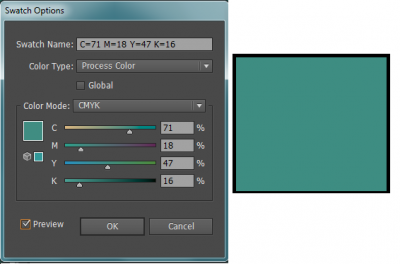
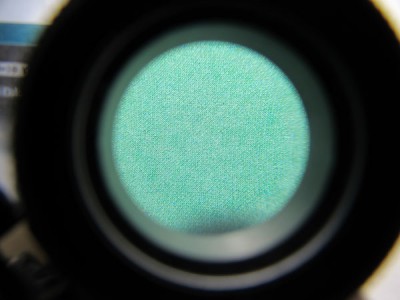
A printed color that appears smooth and solid can actually be made from many tiny process-color dots.
When viewed through a printer's loupe, those dots become visible. Cyan, magenta, yellow and black dots can overlap or sit alongside one another in different proportions, creating the appearance of a single continuous color from normal viewing distance.
This halftone process is one of the fundamental ways commercial printing reproduces photographs, gradients and tonal artwork using only a limited set of process inks.
RGB and CMYK create color in fundamentally different ways.
RGB stands for Red, Green and Blue. It is an additive color model used by screens, cameras and many digital devices because those devices create color with emitted light.
CMYK is used for commercial printing because ink is placed on a physical surface. Some bright RGB colors can fall outside the printable CMYK color gamut, so the appearance of certain colors may change when artwork is converted for print.
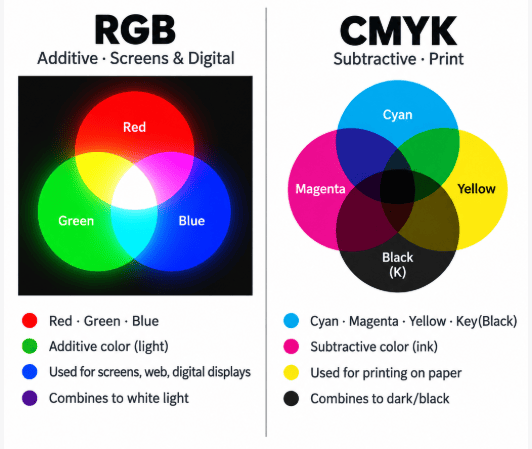
Photos and digital artwork often originate in RGB and must be interpreted appropriately for commercial printing.
Photoshop provides color-management tools for converting and preparing raster images for CMYK printing.

Illustrator can create documents and vector artwork using CMYK process colors for commercial print production.

InDesign is commonly used to assemble print layouts containing text, vector graphics and linked images for commercial output.
The exact appearance of a conversion depends on the original color, document settings, color profiles, paper and printing process. For that reason, converting RGB to CMYK should not be treated as a guarantee that every screen color will reproduce identically in print.
Color mode is important, but it is only one part of preparing a reliable print file.
Build the artwork at the intended finished size so images, typography and margins are evaluated accurately.
Extend backgrounds and images beyond the trim wherever artwork is intended to print to the edge.
Check whether the document, images and graphics are prepared appropriately for CMYK or any required spot colors.
Raster images should generally have sufficient effective resolution at their final printed size.
Small black type and fine lines often require different color treatment than large rich-black backgrounds.
Export the completed layout using appropriate print settings and review the final PDF before submission.
Color mode and image resolution solve different problems.
A photograph can be in CMYK and still print poorly if its effective resolution is too low. Enlarging a small web image does not create additional image detail and can result in visible pixelation or softness.
For many commercial printing applications, approximately 300 pixels per inch at the final reproduced size is a common target for photographic artwork. Different print processes and image types may have different requirements.
Evaluate resolution at the size the image will actually be printed, not just the original file dimensions.
Images copied from websites are often optimized for screens rather than commercial print reproduction.
Whenever possible, work from the best available source image rather than compressed copies.
Check image sharpness and quality in the final print-ready layout before submitting the project.
For small black type and fine black lines, a simple black build is generally preferable to creating the element from all four process colors.
In four-color printing, cyan, magenta, yellow and black must align accurately. If small black text is built from all four colors, even slight registration variation can make the edges appear less crisp.
Using 100% black for small text allows that text to print from the black separation alone.
Process color is appropriate for photographs and designs containing many colors, but some print projects may instead use one or more dedicated spot colors.
Most problems can be reduced by checking the artwork before the file reaches production.
Monitors create color with light, while printed pieces use ink and paper. Those systems do not reproduce every color identically.
Changing an image to CMYK does not improve its underlying resolution. Low-quality source artwork can still reproduce poorly.
Small black type created from multiple process colors can become less crisp if the separations are not perfectly aligned.
Coated and uncoated papers absorb and reflect ink differently, which can affect the appearance of printed color.
Some saturated screen colors cannot be reproduced directly inside the printable CMYK gamut and may shift during conversion.
Always review the exported print file for page size, bleed, image quality, missing artwork and other production issues.
CMYK stands for Cyan, Magenta, Yellow and Key, with Key referring to black. These are the four process colors used for most full-color commercial printing.
CMYK printing is commonly referred to as full-color, four-color or process-color printing because the four process inks combine to reproduce many different colors.
Color separation divides full-color artwork into cyan, magenta, yellow and black components so the image can be reproduced using the four process colors.
RGB uses red, green and blue light to create color on screens. CMYK uses cyan, magenta, yellow and black inks to reproduce color on printed materials.
RGB and CMYK have different color gamuts. Some bright or highly saturated colors visible on a screen cannot be reproduced exactly using standard CMYK inks, so their appearance may shift during conversion.
Approximately 300 pixels per inch at the final printed size is a common target for photographic images in many commercial printing applications, although requirements can vary by product and printing process.
Small black text is commonly prepared as C0 M0 Y0 K100 so it prints using only the black separation and does not rely on registration of all four process colors.
No. CMYK is well suited to photographs and multi-color artwork, while a Pantone or other spot color may be appropriate when a project requires a specific premixed ink or controlled brand color.
Tell MMPrint what you are producing, the quantity and your project specifications. Our team can review your printing requirements and provide a custom quote.