


print-ready-checklist
Print-Ready File Checklist
A properly prepared print file helps prevent production delays, unexpected changes, and avoidable artwork corrections. Use this checklist before submitting your files to MMPrint.
PDF files are preferred for most printing projects. If your project has unusual specifications or you're unsure about a file, send us what you have and our prepress team can review it.
Check the Important Details Before You Upload
Start with the areas below. These are some of the most common file-preparation issues that can affect a printed piece.
Quick Print-Ready Checklist
Before uploading artwork, confirm the basics below.
Document Setup
Confirm the finished size, page count, orientation and layout match the product you're ordering.
Bleed
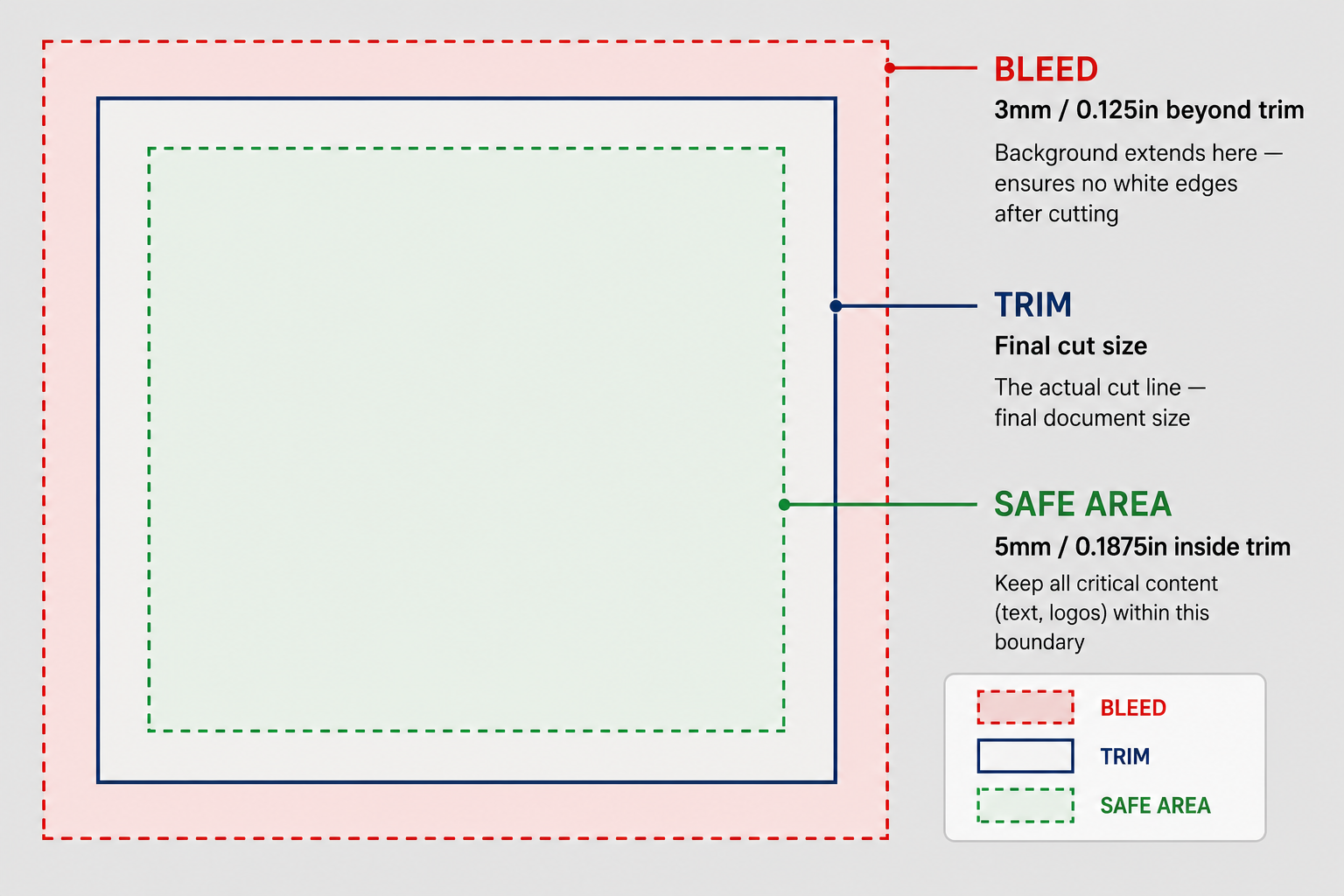
Any background, photograph or graphic that reaches the finished edge should extend 0.125 inch beyond the trim line.
Safe Area
Keep text, logos and other important elements comfortably inside the finished trim. Allow additional space around folds, binding, drilling and other finishing operations.
Images
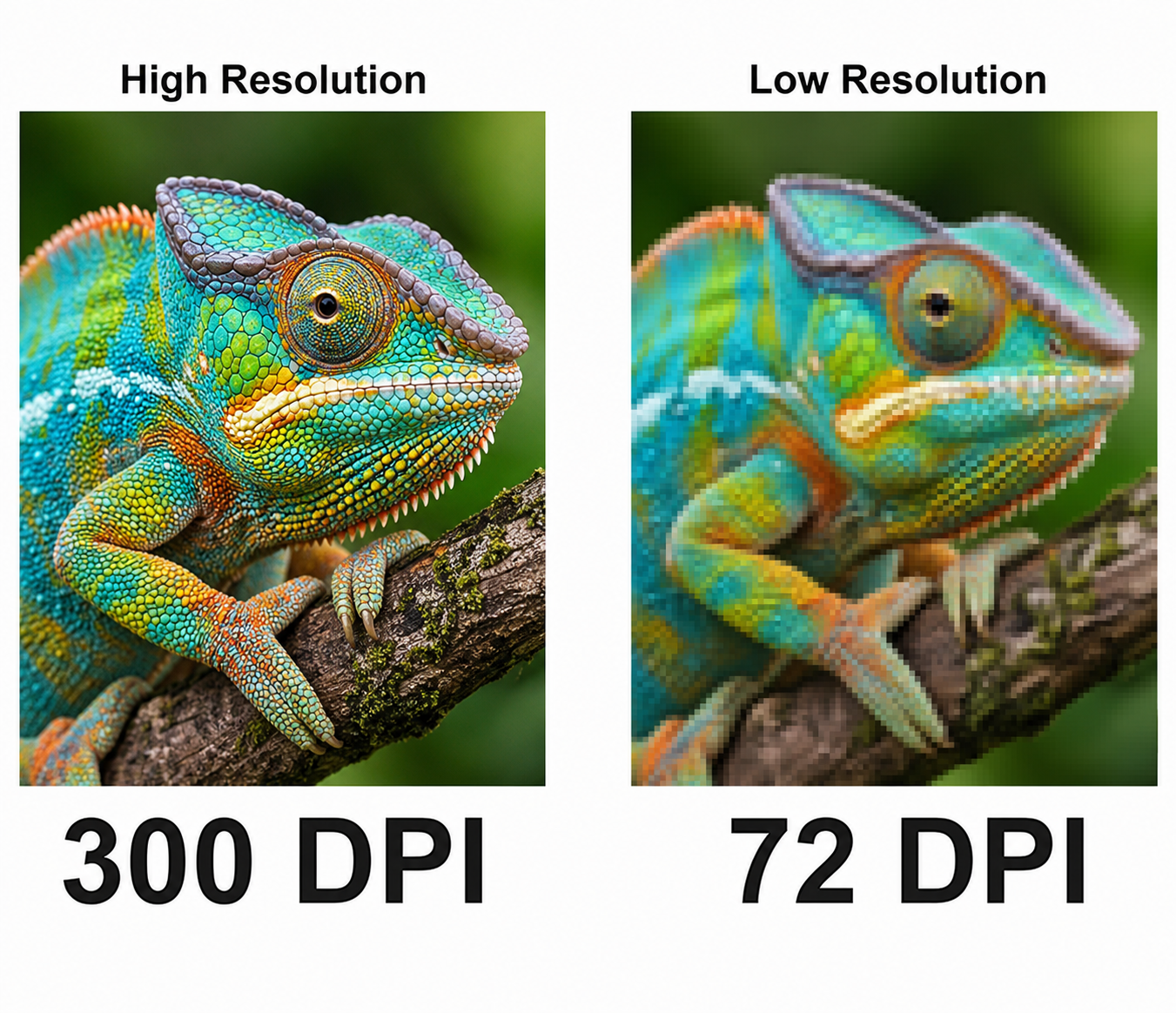
Check photographs and raster graphics at their final reproduction size. For most commercial printing, 300 DPI at final size is preferred.
Color
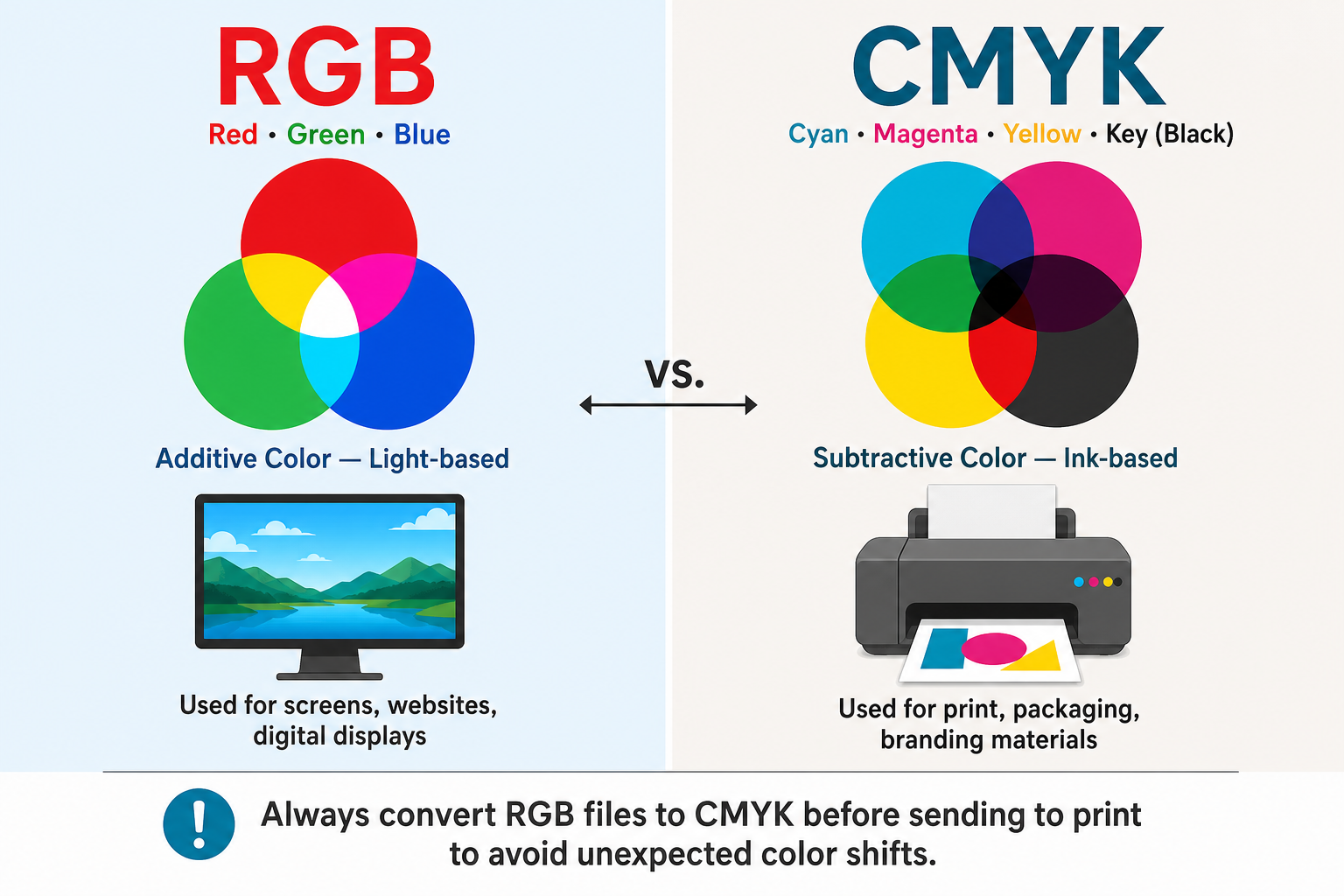
Prepare process-color artwork in CMYK whenever possible and identify any intentional Pantone or spot colors.
Final File
Review every page of the exported PDF for missing fonts, substituted characters, incorrect images, unexpected transparency, page-size problems and other visible errors.
Start With the Correct Document Size
Your document should be created for the finished size of the printed piece. A finished 8.5 x 11 inch brochure, for example, should be designed around an 8.5 x 11 inch trim size rather than placed in the middle of a larger sheet.
If a color, photograph or graphic is intended to print all the way to an edge, extend that artwork 0.125 inch beyond the trim line. This extra artwork is the bleed and allows the piece to be trimmed without leaving an unwanted white edge.
Text, logos and other important information should remain safely inside the trim. Projects with folds, binding, drilling, die cutting or other finishing may require additional clearance.
Use High-Resolution Images at Their Final Size
A photograph can look acceptable on a screen and still print soft or pixelated. Screen display and commercial printing have different resolution requirements.
For most printed materials, raster images should be approximately 300 DPI at the size they will actually be printed. Enlarging a small image inside a layout reduces its effective resolution.
Logos and line artwork are generally best supplied as vector artwork when available because vectors can be scaled without becoming pixelated.
Prepare Color for Printing, Not Just for a Screen
Most full-color commercial printing is produced using CMYK: cyan, magenta, yellow and black. RGB is intended primarily for screens and can contain colors that cannot be reproduced exactly with standard CMYK printing.
Converting RGB artwork to CMYK can change the appearance of some bright or saturated colors. If color is important to your project, review your files carefully before approving the final proof.
Black Artwork
Small black type and fine black lines are generally best kept as black-only artwork. Large solid black areas may require a different color build depending on the project and printing process.
Pantone & Spot Colors
If your artwork intentionally uses a Pantone or other spot color, let us know when requesting your quote. Spot-color production may be handled differently from standard four-color printing.
Check Fonts, Graphics and Transparency
A PDF should contain everything necessary to reproduce the approved design correctly.
Embed Your Fonts
Fonts should be properly embedded when creating the PDF. If your design software and workflow call for it, converting type to outlines can also prevent font substitution, although outlined text can no longer be edited as live type.
Make Sure Linked Graphics Are Included
If you are supplying native design files instead of a PDF, include all linked photographs, illustrations and other placed graphics used by the document.
Review Transparencies and Effects
Drop shadows, transparency, blending modes and other effects should be checked in the final exported PDF. Do not assume the exported file looks exactly like the working document without reviewing it.
Check Overprint Settings
Incorrect overprint settings can cause artwork to disappear or print differently than expected. Pay particular attention to objects or colors where overprinting has been applied intentionally.
Supply Pages in Reading Order
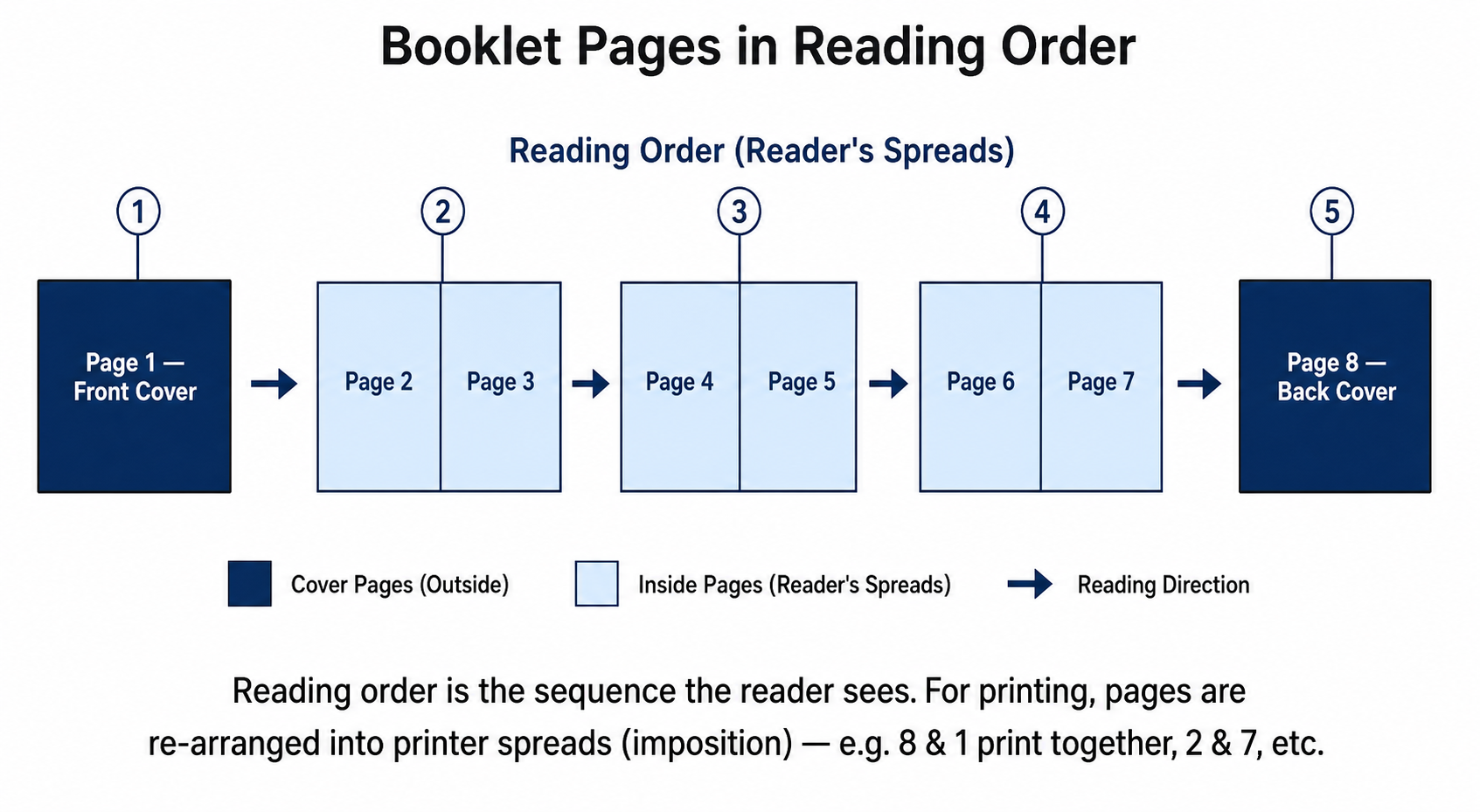
For most booklets, catalogs, programs and other multi-page projects, supply individual PDF pages in normal reading order unless your MMPrint representative or a supplied template specifically instructs you otherwise.
Do not manually arrange printer spreads unless they have specifically been requested. Production imposition is normally handled as part of the printing workflow.
Keep important content clear of the binding edge and allow sufficient room for folds, drilling, spiral binding, Wire-O, perfect binding or other finishing used by your project.
Create and Review Your Final PDF
PDF is preferred for most MMPrint projects because it helps preserve page geometry, fonts, graphics and layout across different systems.
Use the Correct Page Size
Verify the PDF page dimensions correspond with the intended finished product and that any required bleed extends beyond the trim.
Include Bleed in the Export
Creating bleed in your design document is only the first step. Make sure the bleed is actually included when the final PDF is exported.
Crop Marks Do Not Replace Bleed
Crop or trim marks identify where a piece is intended to be cut. Artwork that reaches the edge still needs to extend beyond that trim line.
Open the PDF and Inspect It
Review the exported PDF itself rather than relying only on the original design file. Check every page for artwork changes, missing elements, incorrect page sizes and anything else that does not look as intended.
Some Projects Need More Than a Standard PDF
Specialty finishing, mailing and personalized printing can require additional production information.
Die Cutting, Scoring & Specialty Finishing
Custom die cuts, scores, perforations and similar finishing may require separate production lines or templates that clearly identify where the finishing operation belongs.
Ask us for setup requirements before finalizing complex artwork.Variable Data & Mailing Projects
Personalized names, addresses, barcodes or other changing information require both artwork and usable variable-data files. Mailing projects may also have layout requirements that differ from standard print-only pieces.
Confirm the specifications before preparing final files.Use the Template Provided on the Product Page
When a design template is available, you'll find it on the corresponding MMPrint product page. Templates can help establish the correct finished size, bleed, folds, panels, safe areas, and other production guides before you begin designing.
Browse All ProductsNot Sure Whether Your File Is Print-Ready?
You do not need to be a print-production expert to work with MMPrint. Our team reviews supplied artwork as part of the production process and can identify common technical problems before printing.
File review is not a substitute for proofreading. Customers should carefully review spelling, grammar, dates, phone numbers, addresses, page order, pricing and other content when approving their proof.
If you know your file needs design changes or production assistance, let us know when requesting your quote so we can review the project appropriately.
Print-Ready File FAQ
What file format does MMPrint prefer?
PDF is preferred for most printing projects because it preserves the document layout and reduces many common font and file-compatibility problems.
How much bleed should I add?
For most standard MMPrint projects, artwork intended to print to the finished edge should extend 0.125 inch beyond the trim line on each applicable side.
What resolution should images be for printing?
Approximately 300 DPI at final reproduction size is preferred for most photographs and raster images used in commercial printing.
Should my file be RGB or CMYK?
CMYK is preferred for most standard full-color commercial printing. RGB artwork may change in appearance when converted to the printable CMYK color space.
Should I send booklet pages as spreads?
Usually no. Supply individual pages in normal reading order unless your MMPrint representative or the template for your specific product instructs you otherwise.
Does MMPrint check my artwork before printing?
MMPrint reviews supplied artwork for common production issues as part of the prepress process. You are still responsible for carefully reviewing the final proof for spelling, content, layout and other details before approval.
What if I can't make my file print-ready?
Send us the project information you have. A print specialist can review the job and help determine what may be needed before production.
Send Us Your Project
Have a print-ready file or a project that needs a little help? Send us the specifications you have and an MMPrint print specialist can review the details.